Designing AI Interfaces Users Can Trust: How Transparency, UX, and Explainability Build Confidence

When the AI Sounds Confident… and Everyone Gets Nervous
Artificial intelligence has an uncanny habit of sounding very sure of itself (kind of like this article ;-). It recommends a product, flags a transaction, denies a loan, or predicts customer churn - all with the calm authority of someone who definitely knows what they’re doing. The problem? Users often have no idea why the AI made that call.
For many people, interacting with AI can feel like asking for advice from a mysterious oracle hidden behind frosted glass. The oracle might be right. It might be wrong. It might be hallucinating. But it rarely explains itself, and that makes users uneasy.
This discomfort is more than a usability issue - it is a trust issue. As AI-driven systems increasingly influence business decisions, customer experiences, healthcare recommendations, and financial outcomes, trust has become a defining factor in adoption and success.
So, how can UX designers and product teams design AI interfaces that users can trust? Specifically, let discuss how visualizing uncertainty, revealing AI reasoning, and empowering user judgment can transform opaque systems into transparent, human-centered experiences.
Why Trust Is the Foundation of AI Adoption
Trust is not a “nice to have” in AI products. It is a prerequisite.
The Business Cost of Distrust in AI
When users do not trust AI systems, they either disengage or override them. In business environments, this leads to:
- Employees ignoring AI recommendations
- Customers abandoning AI-powered tools
- Decision-makers demanding manual reviews
- Increased operational costs and slower workflows
Even highly accurate AI models fail to deliver value if users do not believe them - or worse, fear them.
Trust Is a UX Problem, Not Just a Technical One
While data scientists focus on model accuracy, UX designers shape perception. Users do not interact with algorithms; they interact with interfaces.
A system that hides uncertainty, provides no rationale, and removes user agency signals a lack of respect for the human in the loop. Conversely, an interface that explains itself, admits uncertainty, and invites collaboration fosters confidence - even when outcomes are imperfect.
The Transparency Gap in AI Interfaces
Many AI products struggle with what can be called the transparency gap: the disconnect between how AI systems operate and how users experience them.
Black Boxes Create Cognitive Friction
From a user’s perspective, opaque AI systems introduce several problems:
- Unclear decision logic: Users cannot tell what factors mattered
- No error context: When results are wrong, there is no explanation
- Loss of control: Users feel overruled rather than supported
This friction creates anxiety, especially in high-stakes contexts such as finance, healthcare, hiring, and cybersecurity.
Explainability Is About Communication, Not Code
Explainable AI (XAI) is often discussed as a technical challenge. In practice, it is equally a communication challenge.
Users do not need mathematical proofs or model weights. They need explanations that are contextual, understandable and most importantly - relevant to their goals
UX design plays a critical role in translating AI reasoning into human language and visual cues.
Visualizing Uncertainty Instead of Hiding It

One of the fastest ways to lose trust is to pretend uncertainty does not exist whether it is an AI interface, or something as simple as a website.
Why Confidence Without Context Backfires
AI systems frequently present outputs as definitive: a single score, label, or recommendation. This false certainty can mislead users into over-relying on the system or distrusting it entirely when errors occur.
Users are surprisingly comfortable with uncertainty - as long as it is clearly communicated.
UX Patterns for Visualizing AI Uncertainty
Effective AI interface design makes uncertainty visible and meaningful. Common techniques include:
- Confidence ranges: Showing probability bands instead of single values
- Likelihood labels: “High confidence,” “Moderate confidence,” or “Low confidence”
- Visual indicators: Shaded areas, gradients, or error bars
- Comparative options: Showing multiple plausible outcomes
These patterns signal honesty and reduce cognitive shock when predictions change.
Business Value of Honest Uncertainty
When uncertainty is acknowledged:
- Users calibrate expectations appropriately
- Decision-makers apply human judgment where needed
- Accountability becomes shared, not shifted entirely to the AI
Trust grows not because the AI seems perfect, but because it seems transparent.
Showing Reasoning Without Overwhelming Users
Understanding why an AI made a recommendation is often more important than the recommendation itself.
The Difference Between Explanations and Justifications
Good AI explanations focus on helping users understand what factors influenced a particular result. They provide meaningful context without demanding technical expertise from the audience. In contrast, poor explanations either overwhelm users with unnecessary technical detail or rely on vague phrases such as “based on historical data,” which offer little real insight and can actually reduce trust.
Effective AI reasoning is communicated selectively rather than exhaustively. Instead of presenting every possible data point, the interface highlights what matters most for the user’s decision. These explanations should also be tailored to different user roles, ensuring that each audience receives information at an appropriate level of depth. Presenting reasoning progressively further improves clarity, allowing users to explore more detail only when they choose to do so.
Layered Explanations: A UX Best Practice
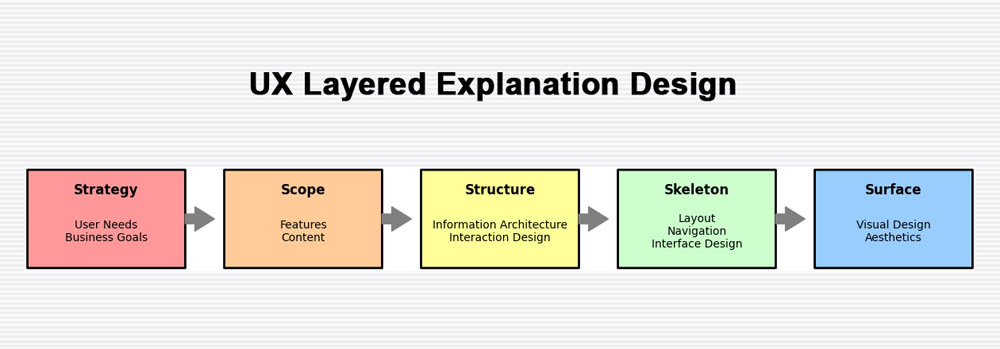
One of the most effective UX approaches for building trust in AI systems is layered explanation design. This method structures explanations into clear levels of detail. At the surface level, users see a short, plain-language reason that quickly answers why a recommendation or decision was made. You can find more info on this in our Podcast on AI and UX Strategies.
A secondary layer provides additional context by highlighting the key factors that contributed to the outcome. For users who need deeper insight, a final layer offers access to underlying data sources, assumptions, or logic paths, supporting transparency without overwhelming the broader audience.
This allows casual users to move quickly while giving advanced users deeper insight when needed.
Visual Techniques That Support Explainability
Designers can use:
- Feature importance bars
- Highlighted data points
- Decision trees simplified into flows
- Natural language summaries
The goal is not to expose the model - but to illuminate its thinking.
Empowering Users Instead of Replacing Them
Trust increases when users feel supported, not displaced.
Human-in-the-Loop Design Builds Confidence
AI systems that position themselves as decision-makers often trigger resistance. Systems that act as advisors are far more effective.
Empowering interfaces:
- Invite user confirmation
- Allow overrides with feedback
- Show alternative recommendations
- Encourage critical evaluation
This reinforces the idea that AI augments human expertise rather than replacing it.
Feedback Loops Strengthen Trust Over Time
When users can provide feedback - correcting errors or refining outputs - they become collaborators in the system’s improvement.
Clear feedback mechanisms also communicate humility: the system is learning, not infallible.
Designing for Different Levels of AI Literacy
Not all users understand artificial intelligence in the same way, and effective interface design must reflect this reality. AI-powered systems are often used by people with vastly different levels of technical knowledge, comfort, and responsibility. When interfaces assume a uniform level of AI literacy, they risk alienating users, creating confusion, or undermining trust. Designing for varying levels of understanding is therefore essential to creating AI experiences that feel accessible, credible, and useful.
Matching Explanation Depth to User Roles
Within a single organization, a data analyst, an executive, and a frontline employee may all interact with the same AI system, yet their needs and expectations differ dramatically. A data analyst may want deeper insight into how a model arrived at a particular outcome, while an executive may only need a high-level rationale to support strategic decisions. Frontline employees, on the other hand, often require clear, actionable guidance without unnecessary complexity.
Effective AI UX adapts to these differences by adjusting language based on the audience and presenting information in role-appropriate ways. Interfaces that use role-based views allow each user to see explanations that align with their responsibilities and decision-making authority. By avoiding one-size-fits-all explanations, designers can ensure that AI insights remain relevant and understandable across the organization.
Avoiding Jargon Without Oversimplifying
Technical terminology such as “neural network” or “gradient boosting” rarely increases user trust. For most audiences, these terms introduce friction rather than clarity. Clear metaphors, practical examples, and plain language explanations are often far more effective at conveying how an AI system works and why its outputs can be trusted.
The true measure of success in AI interface design is not technical precision, but user comprehension. When users can confidently explain, in their own words, why a system made a recommendation, the interface has achieved its goal. Simplifying language does not mean oversimplifying ideas; it means translating complexity into insight.
Ethical Signals Matter More Than Disclaimers
Trust in AI systems is shaped not only by what an interface explicitly shows, but also by what it implicitly communicates. Ethical intent is often conveyed through subtle design choices rather than formal statements or legal language. Users quickly pick up on these signals and use them to judge whether a system deserves their confidence.
Subtle Design Choices Communicate Values
AI interfaces that feel trustworthy typically include clear explanations of how data is used, along with messaging that acknowledges the potential for bias and outlines how it is being addressed. Ethical guardrails, when surfaced in context rather than hidden in documentation, further reinforce a sense of responsibility. A calm, respectful tone throughout the interface also plays an important role, signaling that the system is designed to support users rather than control them.
Together, these elements reassure users that the AI was built with care and intention, not just speed or technical ambition.
Compliance Alone Does Not Build Trust
Legal disclosures and compliance badges are necessary components of responsible AI, but they are not sufficient on their own. Users rarely develop trust by reading footnotes or privacy policies. Instead, trust is earned through everyday interactions that consistently demonstrate fairness, transparency, and respect. When ethical behavior is embedded into the interface itself, compliance becomes a foundation rather than a substitute for trust.
Measuring Trust as a UX Outcome
Trust should be treated as a measurable design outcome rather than an abstract or assumed quality. In AI-driven products, trust directly influences whether users adopt the system, rely on its recommendations, or abandon it altogether. Without measuring trust, teams are left guessing whether confusion, hesitation, or resistance stems from poor usability, unclear explanations, or deeper concerns about transparency and control. By making trust a measurable metric, organizations can identify where users feel uncertain or disengaged and tie those insights back to specific interface decisions, such as how explanations are presented, how uncertainty is communicated, or how much agency users are given in the decision-making process.
Measuring trust also has a direct impact on UX design iteration and prioritization. When trust-related signals - such as frequent overrides, low engagement with AI features, or negative qualitative feedback - are tracked alongside traditional usability metrics, designers gain a clearer picture of how interface choices affect user confidence. This enables more informed design improvements, shifting UX efforts from simply making AI features usable to making them credible and reassuring. Over time, treating trust as a core UX outcome helps teams design interfaces that not only function well, but also foster long-term confidence, sustained adoption, and meaningful human–AI collaboration.
Indicators of Trustworthy AI UX
Teams can assess trust through:
- Adoption and continued usage
- Frequency of overrides
- User confidence surveys
- Task completion rates
- Qualitative feedback
When trust improves, efficiency and satisfaction typically follow.
Conclusion: Designing AI That Deserves Trust

Trustworthy AI is not achieved by smarter models alone. It is built - screen by screen - through thoughtful UX design.
By visualizing uncertainty, explaining reasoning clearly, and empowering users to remain active decision-makers, AI interfaces can shift from intimidating black boxes to reliable collaborators. Transparency does not weaken AI systems; it strengthens them by aligning machine intelligence with human expectations.
For business and technology leaders, the takeaway is clear: investing in explainable, human-centered AI interface design is not just good ethics - it is good strategy.
The next step is simple and actionable: audit existing AI interfaces not for accuracy alone, but for clarity, honesty, and user empowerment. Trust, after all, is designed - never assumed.
To have a deeper conversation about AI and UX design, and which UX strategy will be best for your digital development project, please CONTACT ScreamingBox.
Check out our Podcast on AI and UX Strategies for an in-depth look at how companies are dealing with CyberSecurity and what are the latest trends to address security threats..